Examples and Applications
This section describes the specific usage of common example VIs in the VIRobotics/AI Agent directory.
Recommended reading order:
Basic chat and streaming chat first
Then tool calling and visual understanding
Finally, run the complete Agent example
Example Entry Points
Path:
LabVIEW install path\examples\VIRobotics\AI AgentMenu:
Help -> Find Examples -> Directory Structure -> VIRobotics -> AI Agent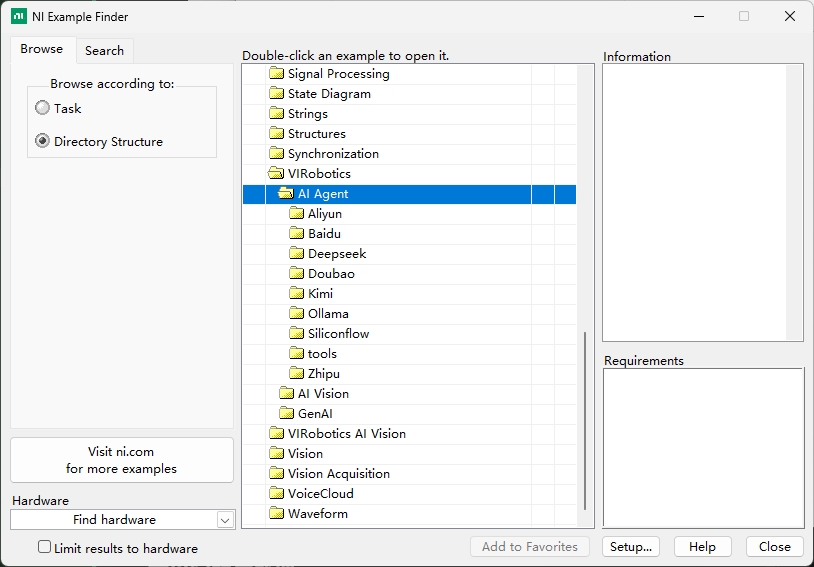
Current examples are organized by LLM model provider:
AliyunBaiduDeepseekDoubaoKimiOllamaSilliconflowZhiputools
Notes:
Each provider folder typically contains: basic chat VIs, streaming output VIs, tool calling VIs, and complete Agent VIs.
The
Aliyunfolder includes vision understanding VIs in addition to the common examples above.The
Doubaofolder includes vision-related VIs (visual understanding, text-to-image, image-to-image, image fusion) in addition to the common examples.
Quick Index by Provider (Select API First, Then Examples)
If you have only obtained an API Key from a single provider, use the following table for quick reference:
| Provider Folder | Priority Examples |
|---|---|
Aliyun |
basic.vi, stream.vi, basic_call_tools.vi, stream_with_tools.vi, AI_Agent_Full.vi, vision understanding VIs |
Baidu |
basic.vi, stream.vi, basic_call_tools.vi, stream_with_tools.vi, AI_Agent_Full.vi |
Deepseek |
basic.vi, stream.vi, basic_call_tools.vi, stream_with_tools.vi, AI_Agent_Full.vi |
Kimi |
basic.vi, stream.vi, basic_call_tools.vi, stream_with_tools.vi, AI_Agent_Full.vi |
Ollama |
basic.vi, stream.vi, basic_call_tools.vi, stream_with_tools.vi, AI_Agent_Full.vi |
Silliconflow |
basic.vi, stream.vi, basic_call_tools.vi, stream_with_tools.vi, AI_Agent_Full.vi |
Zhipu |
basic.vi, stream.vi, basic_call_tools.vi, stream_with_tools.vi, AI_Agent_Full.vi |
Doubao |
Common examples + text_to_img_test.vi, image_to_image.vi, image_fusion.vi, vision understanding VIs |
tools |
basic_tools and vi_advisor tool directories |
Reading recommendations:
Core content is organized by capability categories (reducing redundant learning).
Single-provider users can refer to this table first, then jump to corresponding capability sections.
I. Basic Chat VIs
VI Name: basic.vi
Purpose: The most basic Q&A example, non-streaming output, suitable for initial model pipeline verification.
Implementation Flow:
Initial_xxx.viinitializes the LLM instance and selects the modelSet_System_Prompt.visets the system roleGenerate_Prompt.visends user query and retrieves complete responseRelease.vireleases resources
Input Parameters:
model: Model nameprompt: User querysystem_prompt: System role (optional)
Output Results:
content: Model responsereasoning_content: Reasoning process (supported by some models)
Operation Steps:
Open
basic.viSelect model and fill in
promptEnter prompt text
Run VI and check
contentAfter completion, release instance resources
Applicable Scenarios:
Initial integration verification
Simple Q&A and text generation
Non-real-time display scenarios
Common Issues
No response: Check API Key and account balance first
License error: Verify
genaiandvi_advisorstatus in the activation section
II. Streaming Output VIs
VI Name: stream.vi
Purpose: Streaming chat example with real-time model response display.
Implementation Flow:
Initialize LLM instance and select model
Set
stream=Truevia property nodeOuter loop listens for
sendbuttonInner loop continuously reads streaming chunks and concatenates for display
Click
stopor release resources after task completion
Input Parameters:
model: Model nameprompt: User inputenable_thinking: Whether to enable chain-of-thought (supported by some models)send/stop: Send and stop controls
Output Results:
Assistant: Real-time output content (finally concatenated into complete response)reasoning_content: Chain-of-thought content (if supported by model)
Operation Steps:
Open
stream.viSelect model, enter
promptSet
enable_thinkingas neededClick
sendto run and observe real-time outputClick
stopafter completion
Applicable Scenarios:
Long text generation
Real-time interactive interfaces
Chat flows requiring side-by-side debugging
Common Issues
No streaming output: Confirm model supports streaming and check API balance
Output interruption: Check network connectivity and proxy settings
III. Tool Calling VIs
VI Name: basic_call_tools.vi
Purpose: Demonstrates the complete pipeline for LLM calling external tools.
Implementation Flow:
Define tool description (
name,description,parameters)Pass tool list to LLM instance
Send user request and retrieve
Tools_callsExecute tool and produce tool results
Use
Generate_Tool_Call_Results.vito return resultsGet final natural language response
Input Parameters:
prompt: User querytools: Tool definition list (JSON)messages_tools: Tool execution results
Output Results:
Tools_calls: Model's requested tool call informationcontent: Final response after integrating tool results
Operation Steps:
Open
basic_call_tools.viConfigure one or more tool definitions
Enter queries with tool intent (e.g., weather, file I/O)
After running, read
Tools_callsExecute tool and return results, check final response
Applicable Scenarios:
Intelligent assistants
Business data queries
IoT/Device control
Automated business workflows
VI Name: stream_with_tools.vi
Purpose: Combination example of streaming output + tool calling.
Implementation Flow:
Initialize streaming chat
Load tool list
Receive user requests and perform streaming inference
Trigger tool calls and continue streaming output
Input Parameters:
model: Modelprompt: User querytools: Select required tools
Output Results:
Assistant: Final response after integrating tool results
Operation Steps:
Open
stream_with_tools.viConfigure model and tools
Enter tasks with tool requirements
Run and observe streaming + tool pipeline
Applicable Scenarios:
Online assistants
Real-time control scenarios
Visual debugging scenarios
Common Issues
No continued output after tool execution: Check tool return data format
Significant output delay: Check tool execution time and network quality
IV. Visual Understanding VIs (VLM)
Prerequisites: Ensure
AI Vision Toolkit for GPUis installed first.
VI Name: VL.vi / Qwen_VL.vi
Purpose: Image understanding and visual Q&A.
Implementation Flow:
Use
imread.vito read imageUse
cvtColor.vito convert color space (BGR -> RGB)Call
Generate_Prompt_imgs.viwith image and text queryRetrieve and display image understanding results
Input Parameters:
model: Vision-language modelimgName: Image filename or pathprompt: Image-related question
Output Results:
result: Image analysis textpicture: Original image display
Operation Steps:
Open
VL.viorQwen_VL.viSelect model and load image
Enter image question
Run and check
result
Applicable Scenarios:
Image content understanding
Defect description and explanation
OCR pre-analysis and visual Q&A
Common Issues
Image cannot be read: Check path and format
Generic analysis results: Clarify objectives in
prompt(recognition/statistics/description)
VI Name: VL_Draw_Box.vi
Purpose: Image object detection and visual annotation.
Implementation Flow:
Input image and detection task description
Call visual understanding interface to get object positions
Parse bounding boxes and draw on image
Output annotated image and detection results
Input Parameters:
Image input
Detection prompt or target category description
Output Results:
Detection labels,
bbox, confidence scoresAnnotated image with drawn boxes
Operation Steps:
Open
VL_Draw_Box.viLoad image and enter detection requirements
Run and check box selection results
Verify labels and positions for accuracy
Applicable Scenarios:
Industrial visual inspection
Intelligent monitoring
Robotic vision positioning
Common Issues
Box position offset: Check image scaling and coordinate mapping
Missed detections: Improve prompt clarity or switch models
VI Name: VL_Full.vi
Purpose: Comprehensive visual understanding example supporting multi-image input and batch analysis.
Implementation Flow:
Load multiple images or image list
Set unified analysis prompt
Execute batch inference
Aggregate and output analysis results
Input Parameters:
Image array/path list
Analysis prompt
Output Results:
Batch image analysis results
Optional structured result report
Operation Steps:
Open
VL_Full.viImport multi-image input
Set batch analysis questions
Run and check overall results
Applicable Scenarios:
Batch image inspection
Multi-sample analysis
Automated visual reporting
Common Issues
Long batch processing time: Reduce batch size
Inconsistent result formats: Use fixed prompt templates
V. Image Generation VIs
Prerequisites: ImageGeneration examples are currently primarily based on Doubao capabilities. Ensure
doubao-seedreamis activated and API is configured; also installAI Vision Toolkit for GPU.
VI Name: text_to_img_test.vi
Purpose: Text-to-image generation.
Implementation Flow:
Initialize image generation instance
Set prompt and generation parameters
Call text-to-image interface to generate image
Display and save output image
Input Parameters:
Server="doubao"model="doubao-seedream-4-5-251228"prompt: Prompt textsize: Generated image sizewatermark: Whether to retain "AI Generated" watermark
Output Results:
Generated image (front panel display/saveable)
Operation Steps:
Open
text_to_img_test.viSelect seedream model
Enter
promptand set sizeRun and check output image
Applicable Scenarios:
Document illustrations
Prototype sketches
Creative design generation
Common Issues
Generation failure: Confirm seedream model is activated and API configuration is correct
Results not as expected: Add constraint words and negative prompts
VI Name: image_to_image.vi
Purpose: Image-to-image (redrawing/style transfer).
Implementation Flow:
Input original image
Set transformation description
Call image-to-image interface
Output and compare transformation results
Input Parameters:
Server="doubao"model="doubao-seedream-4-5-251228"prompt: Prompt textsize: Generated image sizewatermark: Whether to retain "AI Generated" watermarkimgPath: Path of original input imageprompt: Prompt text
Output Results:
Transformed image
Operation Steps:
Open
image_to_image.viLoad original image and enter description
Run and compare before/after images
Applicable Scenarios:
Style transfer
Image enhancement
Design variant generation
Common Issues
Large style deviation: Add "preserve subject" constraint in prompt
VI Name: image_fusion.vi
Purpose: Text-image fusion or multi-image fusion generation.
Implementation Flow:
Load 2 or more images as input
Set fusion prompt and parameters
Execute fusion generation
Output fused image
Input Parameters:
Server="doubao"model="doubao-seedream-4-5-251228"prompt: Prompt textsize: Generated image sizewatermark: Whether to retain "AI Generated" watermarkimages: Images to fuse
Output Results:
Fused image
Operation Steps:
Open
image_fusion.viLoad images and enter fusion target
Set optional weights
Run and check fusion effect
Applicable Scenarios:
Multi-source image synthesis
Teaching demo material creation
Visual scheme comparison
Common Issues
Unnatural fusion: Reduce number of fusion targets at once
Detail loss: Improve input image quality and resolution
VI. Complete Agent VIs
VI Name: AI_Agent_Full.vi (Key Example)
Purpose: Comprehensive single-Agent example integrating streaming output, tool calling, and context memory.
Implementation Flow:
Initialize Agent and model configuration
Enable
useToolsand load tool listProcess user input and perform intent recognition
Trigger tool calling when needed and return results
Output streaming responses and maintain context
Input Parameters:
model: Modelthinking_type: Whether to enable thinking modeprompt: Prompt textuseTools: Whether to enable toolsTools: All optional tools, freely selectableSession context parameters
Output Results:
Streaming response content
Tool calling results
Multi-turn conversation state
Operation Steps:
Open
AI_Agent_Full.viConfirm model and API are available first
Check
useToolsEnter tasks with tool intent and run
Observe complete pipeline of reasoning, tool calling, and output
Applicable Scenarios:
Complex task automation
Multi-step workflows
Comprehensive capability acceptance testing
Common Issues
Tools not called: Check tool descriptions, switch status, and tool package license status
Result interruption: Check streaming pipeline and network status
VI Name: AI_Agent_No_Stream.vi
Purpose: Non-streaming complete Agent, suitable for batch processing and backend service scenarios.
Implementation Flow:
Initialize Agent
Enter task and trigger execution
Return complete result at once
Release resources
Input Parameters:
model: Modelprompt: Prompt text
Output Results:
One-time complete response result
Operation Steps:
Open
AI_Agent_No_Stream.viSet model and task
Run and wait for complete return
Validate result content
Applicable Scenarios:
Batch processing
Backend tasks
API encapsulation
Common Issues
Slow response: Switch to streaming version for complex tasks
Output too short: Adjust prompt and model parameters
VII. Common Tools in tools Directory
tools/basic_tools common tools include:
web_searchexecget_file_textwrite_fileget_date_and_timecreate_folderget_img_sizeimg_resizegithub_getvlmtext_to_imageimage_fusionimage_to_image
tools/vi_advisor common tools include:
get_labview_vi_content.viget_vis_of_a_folder.viget_labview_example_folder.vi
For tool creation and tool description specifications, refer to: Tool Development Guide.
Example Usage Recommendations
Beginner:
basic.vi->stream.viIntermediate:
basic_call_tools.vi->stream_with_tools.viComprehensive:
AI_Agent_Full.viImage Generation:
text_to_img_test.vi->image_to_image.vi->image_fusion.viVisual Understanding:
VL.vi,VL_Draw_Box.vi,VL_Full.viCustom Tools: See Tool Development Guide
Technical Support
Technical Support Email: support@virobotics.net
Website: https://www.virobotics.net
QQ Technical Group: 664108337