Module Overview
AI Agent for LabVIEW currently consists of two core modules:
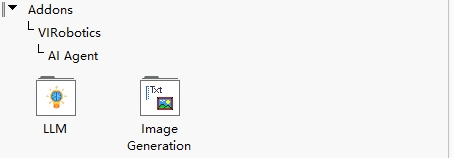
LLMImageGeneration
These two modules together form a complete capability loop from "task understanding" to "result generation".
Module Overview
In a typical workflow:
LLMis responsible for understanding user intent, organizing context, calling tools, image understanding, and result outputImageGenerationis responsible for image generation and image-text fusion processing (can also be called byLLMas a tool)Generated results can be passed back to
LLMto continue to the next task orchestration
This can be understood as:
LLMis the "brain" (understanding, decision-making, image understanding, and output orchestration)ImageGenerationis the "image generation executor" (generation and fusion processing)
Module 1: LLM
The LLM module handles large language model-related capabilities and is the core entry point of the Agent.
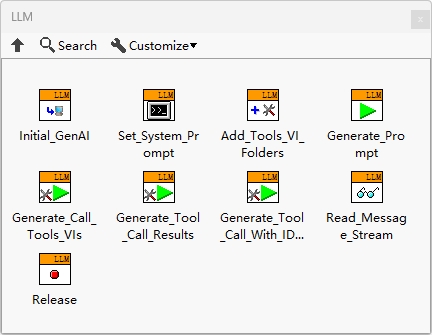
Main Capabilities
Multi-model service provider integration and switching, streaming output
Intent understanding and multi-turn context management
Tool calling (Function Calling)
Image understanding (describing, analyzing, and explaining input images)
Structured output, task decomposition, and result output
Typical Inputs
User natural language instructions
Conversation history (context)
Image input (for image understanding tasks)
Tool list and tool descriptions
Model parameters (temperature, max output length, etc.)
Typical Outputs
Text responses
Image understanding results (descriptions, key points, analysis conclusions)
Tool calling requests (with parameters)
Structured results and final output (for subsequent process handling)
Applicable Scenarios
Intelligent Q&A and engineering assistant
Document understanding and summarization
Image content understanding and explanation
LabVIEW project documentation generation
Multi-step task orchestration and execution
Web search and code generation
Module 2: ImageGeneration
The ImageGeneration module handles image generation and fusion capabilities, supporting text-to-image, image-to-image, and image-text fusion tasks.
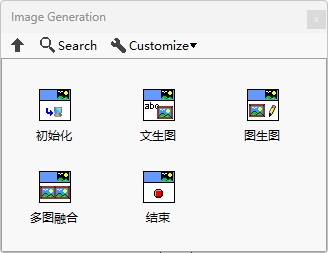
Prerequisites (Important)
Currently, ImageGeneration is primarily based on Doubao model capabilities. Please complete the following preparations before use:
Activate Doubao-related services on Volcano Engine and enable the
doubao-seedreammodelComplete Doubao API configuration in the Agent (endpoint ID used as API Key)
Install Yiqi Intelligence's visual toolkit
AI Vision Toolkit for GPU, download: https://www.virobotics.net/product_AIVT_GPUConfirm that the local environment meets the visual toolkit requirements
Main Capabilities
Text-to-image: Generate images based on text prompts
Image-to-image: Style transfer, redrawing, or variant generation based on input images
Image-text fusion: Combine images and text instructions for editing, enhancement, or content completion
Typical Inputs
Text prompts (target content, style, constraints)
Input images (for image-to-image or image-text fusion)
Optional model parameters (size, clarity, aspect ratio, random seed, etc.)
Typical Outputs
Newly generated or edited image files
Generation task status/result information (success, failure, error reasons)
Applicable Scenarios
Experimental workflow diagrams and documentation illustrations (text-to-image)
Style unification and version iteration of existing images (image-to-image)
Collaborative creation of documents, reports, and teaching materials (image-text fusion)
How the Two Modules Work Together
Recommended minimum loop:
User inputs task (e.g., "Generate a device flowchart and provide explanations")
LLManalyzes requirements and generates image promptsLLMdirectly callsImageGenerationtool to generate imageLLMsupplements explanations based on image results and outputs final response
This pattern is suitable for gradual extension to more complex multi-tool workflows (such as integrating VI-specific modules later).
Development Recommendations
First verify the
LLMconversation pipeline separately, then integrateImageGenerationDefine unified prompt templates for image generation to facilitate team reuse
Make models, parameters, and tool descriptions as configuration items to avoid hardcoding in block diagram logic
Add error handling at key nodes (timeout, quota exceeded, invalid parameters)
Capability Classification and Detailed Descriptions
The following content is extracted from the "Capability Classification and Detailed Descriptions" in the release documentation to supplement the current module definitions.
A. LLM Capability Classification
1) Interaction and Understanding Capabilities
Flexible multi-model integration: Support unified integration and switching between multiple mainstream model service providers
Contextual conversation: Support multi-turn dialogue and context management
Streaming output: Support real-time word-by-word return to improve interaction feedback speed
Image understanding: Can describe, analyze, and explain input images
2) Execution and Orchestration Capabilities
Tool calling (Function Calling): Can call user-written VI tools to complete tasks
Task decomposition and structured output: Support decomposing complex requirements into executable steps
Result output orchestration: Support unified organization and return of "text results + tool results"
3) Extension and Engineering Capabilities
Multi-Agent collaboration: Support multiple Agents for parallel or collaborative processing of complex tasks
Low-code visual development: Follow LabVIEW graphical development paradigm to reduce integration barriers
Pre-built examples: Support rapid verification from basic chat to comprehensive tool calling flows
B. ImageGeneration Capability Classification
ImageGeneration is primarily responsible for image generation and image-text fusion processing, and can be called by LLM as a tool.
Text-to-image: Generate images based on text prompts
Image-to-image: Generate variants, redrawing, or stylized results based on input images
Image-text fusion: Perform targeted editing and enhancement combining images and text constraints